
TL;DR:
- Asking detailed questions before booking helps ensure your DJ can handle venue sound and logistics effectively.
- Confirming load-in times, power access, sound restrictions, and backup plans reduces the risk of on-event emergencies or delays.
Before you tour a single venue, write these eight questions down: Does the DJ know this venue? Can they bring their own speakers? Where is the sound limiter sensor? What is the load-in window? Who controls timing on the day? What backup equipment does the DJ carry? Does the contract cover overtime and cancellation? And does the venue require liability insurance paperwork before the event? Get clear answers to all eight, and your DJ setup will be in solid shape before you sign anything.
Quick on-site confirmation checklist:
- Confirm the DJ can bring external PA speakers (or that the house system is professional-grade)
- Locate the sound limiter sensor and ask who resets it if it triggers
- Walk the load-in route from the parking area to the performance space
- Verify the number of power outlets within reach of the DJ booth
The TLDR: leave the walkthrough with written confirmation of AV responsibility, setup timing, sound restrictions, and who has authority to make day-of decisions.
Table of Contents
- DJ-specific questions to ask at every venue walkthrough
- What to physically check during the venue walkthrough
- Your printable checklist and walkthrough script
- Vendor and planner pro tips that prevent the most common problems
- Red flags at the walkthrough and what reassuring answers look like
- Key Takeaways
- The questions that actually protect your day
- Fiesta Fusion handles the DJ logistics so you do not have to
- Useful sources
- FAQ
DJ-specific questions to ask at every venue walkthrough
These questions are grouped by category so you can move through them in order during the tour. For each one, a sample phrasing is included along with what a reassuring answer actually sounds like.
Experience and venue history
Why it matters: A DJ who has worked at your venue before already knows the room's acoustics, the limiter threshold, and the quirks of the load-in route. That experience is worth asking about directly.
- "Have you performed at this venue before, and do you have references from events here?"
- "What specific challenges does this room present for sound?"
A good answer names the venue, describes the acoustic challenge (hard floors, low ceilings, a narrow dance floor), and explains how they handled it. Vague enthusiasm is not the same as experience.
Equipment and sound
Poor venue sound systems are one of the most common post-wedding regrets, and many built-in AV setups are not professional-grade. The DJ needs to either bring their own system or confirm the house system can handle the room.
- "Can our DJ bring their own PA speakers, or are they required to use the house system?"
- "If we use the house system, will an AV technician be present, and is that included in the venue fee?"
- "Does the DJ provide audio for the ceremony as well as the reception, or reception only?"
If the venue insists on its own system, confirm whether an in-house AV tech will be on-site and whether that service costs extra.
Venue AV vs. DJ-provided AV: how to weigh the options
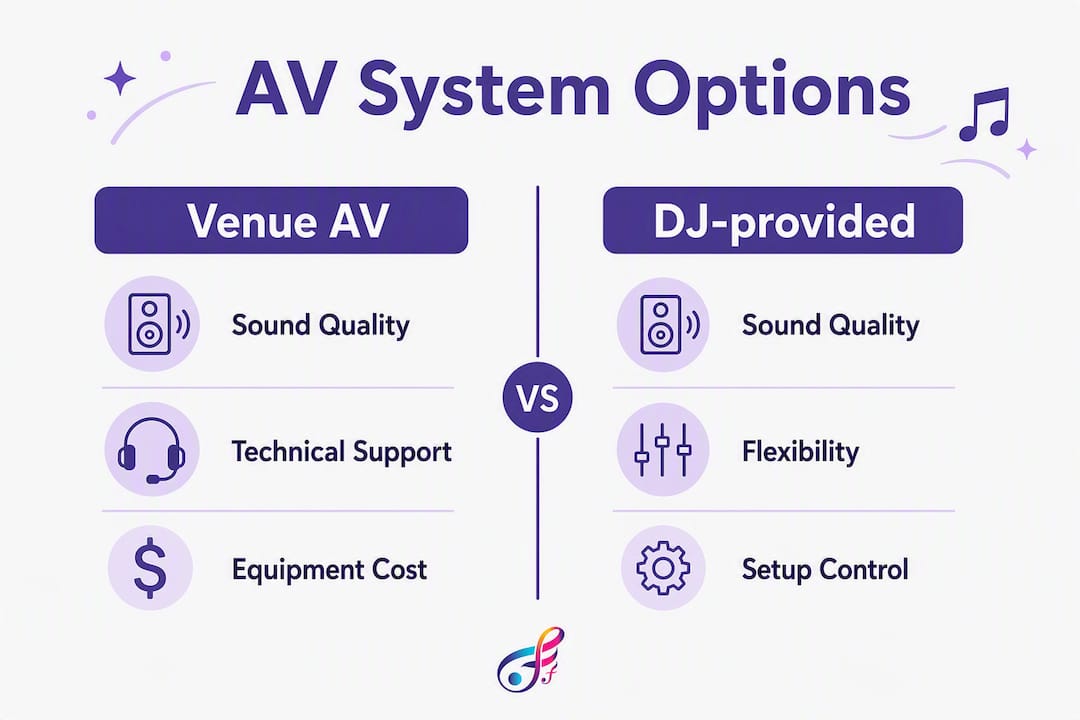
| Criteria | Venue AV system | DJ-provided system |
|---|---|---|
| Sound quality | Varies; often installed for speech, not dance | Calibrated for the event and room |
| Monitoring | Fixed; DJ may not have a booth monitor | Independent monitor with volume control |
| Control | Venue engineer controls levels | DJ has full control |
| Cost | Usually included in venue fee | Included in DJ package |
| Reliability | Depends on maintenance history | DJ is responsible for condition |
Load-in and access
A venue's loading bay, elevator access, and supplier access windows directly affect how much equipment a DJ can bring and how long setup takes. Skipping this conversation is how you end up with a DJ who arrives two hours late because they could not find the freight elevator.
- "What time can vendors access the space for setup, and is there a hard cutoff?"
- "Is there elevator access to the event space, and what are the dimensions of the freight entrance?"
- "Where is the closest parking for a vehicle with equipment?"
Timeline and coordination
Designating one person with authority to make timing decisions on the day keeps the couple free to enjoy the event and reduces friction between vendors. That person is usually the venue coordinator or the wedding planner, not the DJ and not the couple.
- "Who is the day-of contact at the venue, and do they have authority to adjust the timeline?"
- "Will the venue coordinator share a running order with the DJ in advance?"
- "How does the venue handle timing disputes between vendors?"
A reassuring answer names a specific person and confirms they will be in the room, not just on call.
Music, emcee, and requests
The DJ's role as emcee is separate from their role as music provider. Confirm both.
- "Will the DJ serve as emcee for introductions, toasts, and first dances, or is that a separate hire?"
- "How do you handle guest requests, and can we provide a do-not-play list?"
- "What microphones do you provide for speeches and the officiant?"
Pricing and contract items
- "What is the deposit amount, and when is the balance due?"
- "What is the cancellation policy, and is the deposit refundable?"
- "How are overtime charges calculated if the event runs long?"
- "Does the contract specify what happens if the DJ is unable to perform?"
A solid contract answers all four of these in writing before you sign. If the DJ cannot produce a written cancellation and overtime policy, that is a problem.
Backup and contingency
- "What backup equipment do you carry on-site?"
- "Do you have a backup DJ or a substitute if you are ill or unavailable?"
- "Who do we contact if there is a technical failure during the event?"
Pro Tip: Ask the DJ to send you their tech rider before the venue visit. A tech rider lists exact playback, mixer, monitoring, booth, and power requirements. Bring it to the walkthrough and confirm the venue can meet each item.
What to physically check during the venue walkthrough
Questions get you information. The walkthrough gets you confirmation. These are the things to check with your own eyes.
DJ location and sightlines: Stand where the DJ booth will be placed and look toward the dance floor. The DJ needs a clear line of sight to the floor and to the MC area. If a pillar or partition blocks the view, the DJ cannot read the room or respond to energy shifts. A DJ who reads the room and coordinates pacing with the caterer and MC improves guest engagement — but only if they can see the floor.

Power outlets: Count the outlets within cable reach of the booth. A professional DJ setup typically needs at least two dedicated circuits. Ask the venue manager whether those outlets are on a shared breaker with the kitchen or bar, because a microwave or blender tripping a breaker mid-reception is more common than anyone admits.
Sound limiter location: Sound limiters measure total room volume and can cut music automatically if a preset threshold is exceeded. Ask the venue to show you where the sensor is mounted. A sensor near the DJ booth reads differently than one near the dance floor. Also ask who resets the limiter if it triggers, and how long that takes.
Booth table stability and height: The industry standard for a DJ booth table is 90 centimeters. Venues often supply whatever table is available unless you specify otherwise, and an unstable table at the wrong height creates ergonomic problems and wobble risk for expensive equipment.
Load-in route: Walk the full path from the parking area or loading bay to the performance space. Note stairs, narrow doorways, and any distance that would require a long cable run. A cable run over 50 feet often requires signal boosters or a different cable type.
Measurable specs to record during the walkthrough
| Spec | Recommended standard | What to record |
|---|---|---|
| Booth table height | 90 cm | Venue table height: _____ |
| DJ monitor SPL capability | 95 dB at 1 meter | Venue monitor available: Y/N |
| Setup time window | Minimum 90 minutes before guests arrive | Venue access time: _____ |
| Cable run to booth | Under 50 feet preferred | Estimated run: _____ |
| Power outlets at booth | Minimum 2 dedicated circuits | Number available: _____ |
Your printable checklist and walkthrough script
Use this section as a copy-ready reference. Print it, open it on your phone, or paste it into your event planning notes.
Must-confirm before leaving
- AV responsibility confirmed in writing (DJ brings own PA or venue system approved)
- Setup window confirmed with start time and hard cutoff
- Sound limiter threshold and reset process documented
- Day-of contact named with direct phone number
- Liability insurance and any required paperwork deadlines noted
Nice to have
- Floor plan with DJ booth location marked
- Confirmation of elevator or freight access dimensions
- Venue Wi-Fi network name and password for DJ software updates or live streaming
- Confirmation of cocktail hour audio coverage (separate speaker or same system)
Deal-breakers to resolve before signing
- No access window for setup (less than 60 minutes is a serious risk)
- Venue forbids external PA and house system is not professional-grade
- Sound limiter threshold unknown or set below dance-floor levels
- No backup DJ or substitute policy in the contract
Short walkthrough script
Read this aloud or adapt it for your tour:
"We want to confirm a few things about DJ setup. First, can our DJ bring their own PA system, or are they required to use the house system? Second, what time can vendors access the space for load-in? Third, is there a sound limiter, and where is the sensor located? Fourth, who is our day-of contact for timing decisions? And finally, what paperwork does the venue need from our DJ before the event?"
That script covers the five highest-risk items in under 60 seconds.
Follow-up email template
Send this within 24 hours of the walkthrough:
Subject: DJ logistics follow-up from our venue tour
Hi [Venue Coordinator Name],
Thank you for the tour. To confirm what we discussed, could you send over: (1) the floor plan with the DJ booth location marked, (2) the sound limiter threshold and reset process in writing, (3) the supplier access window and load-in instructions, and (4) the list of required vendor documents (liability insurance, etc.) and their submission deadlines?
We will also share a running order with you and our DJ at least two weeks before the event. Please let us know if anything changes with the room layout or AV setup before then.
Pro Tip: Run a final venue check one to two weeks before the wedding to confirm access times, DJ position, power availability, and any room-plan changes. Things shift between booking and event day.
Vendor and planner pro tips that prevent the most common problems
Most walkthrough mistakes are not dramatic. They are small oversights that compound into expensive, stressful problems on the day.
Assuming the house AV is adequate. This is the most common mistake. Venues often have built-in systems designed for speeches, not dance floors. A DJ forced to use an underpowered house system cannot produce the dance-floor energy you are paying for. Always confirm the DJ can bring their own PA, or get the house system specs in writing and have your DJ review them before you commit.
Not knowing who resets the limiter. A sound limiter that triggers mid-reception can kill the energy in seconds. If the only person who can reset it is a venue manager who has gone home, the music stays off. Ask specifically: who resets it, are they on-site all night, and how long does a reset take?
Skipping the tech rider. A DJ tech rider is a short document that lists every technical requirement: mixer inputs, monitor specs, power needs, booth dimensions. Sending it to the venue before the walkthrough means you can confirm compatibility on-site instead of discovering a mismatch the morning of the wedding.
No named timing authority. When the caterer wants to push dinner back 15 minutes and the DJ wants to start the first dance on schedule, someone has to make the call. If that person is not named in advance, the couple gets pulled into a vendor dispute during their own reception.
A running order shared with the DJ and venue coordinator in advance is the single most effective tool for keeping a reception on track. It clarifies who controls timing, reduces on-the-day stress, and gives every vendor a shared reference point when things shift.
Two quick examples of what happens when these checks are skipped: A couple who did not confirm the load-in window discovered their DJ had only 30 minutes to set up a full PA system because the previous event ran long. The DJ made it work, but the first hour of cocktail hour had no music. In a second case, a venue's sound limiter was set at a threshold the couple had never been told about. The DJ hit it twice during the first dance. Neither situation was anyone's fault in isolation. Both were entirely preventable with one conversation during the walkthrough.
Red flags at the walkthrough and what reassuring answers look like
Not every problem is a dealbreaker. Some have fixes. Here is how to tell the difference.
Red flags that need follow-up before you sign:
- The venue cannot confirm whether the DJ may bring external speakers
- No dedicated power circuit near the DJ booth location
- The sound limiter threshold is unknown or "set by the building management"
- Vendor access is restricted to 60 minutes or less before guest arrival
- Required paperwork (insurance, compliance documents) is only discussed after booking
- No named day-of coordinator with authority over timing
Reassuring answers and acceptable mitigations:
- "Our DJ is required to use the house system" becomes acceptable if the venue provides a spec sheet and an on-site AV technician is included in the fee.
- "The sound limiter is set at 95 dB" is workable if the DJ confirms their system can be calibrated to stay under that threshold.
- "Load-in starts at 3:00 PM for a 5:00 PM event" is a solid two-hour window that gives a professional DJ enough time for a full setup and sound check.
- "Our coordinator is on-site from setup through the last dance" is exactly what you want to hear for timing authority.
Quick decision guide:
| Situation | Action |
|---|---|
| Venue confirms DJ can bring own PA | Proceed |
| Venue requires house system, specs provided | Negotiate: confirm AV tech is included |
| Sound limiter threshold unknown | Negotiate: get threshold in writing before signing |
| Load-in window under 60 minutes | Walk away or negotiate a longer window |
| No backup DJ policy in contract | Walk away or require written substitute clause |
Key Takeaways
A successful venue walkthrough for DJ logistics comes down to confirming AV responsibility, load-in access, sound restrictions, timing authority, and backup plans before you sign the contract.
| Point | Details |
|---|---|
| AV responsibility first | Confirm in writing whether the DJ brings their own PA or uses the house system before signing. |
| Sound limiter details | Get the limiter threshold, sensor location, and reset process documented during the tour. |
| Load-in window minimum | A setup window of at least 90 minutes before guests arrive is the recommended standard. |
| Timing authority | Name one person with authority over day-of timing decisions to prevent vendor disputes. |
| Fiesta Fusion coordination | Fiesta Fusion handles tech rider prep, vendor communication, and day-of DJ coordination for Northern Utah events. |
The questions that actually protect your day
Most couples walk into a venue tour focused on how the room looks. The DJ logistics conversation gets pushed to "we'll figure that out later," and later is usually the week before the wedding when options are limited.
The questions in this checklist are not bureaucratic box-checking. They are the difference between a reception where the music stops unexpectedly because a limiter triggered and nobody knew how to reset it, and one where the DJ has full control of the room from the first song to the last dance. The sound limiter question alone has saved more receptions than any amount of playlist planning.
One thing most guides understate: the tech rider is your best tool. A DJ who sends you a rider before the walkthrough is a DJ who has thought through every technical requirement in advance. Bring it to the tour, hand it to the venue coordinator, and walk through it line by line. Any venue that cannot answer the rider's questions is a venue that needs more preparation before your event.
The running order matters just as much. Sharing it with both the DJ and the venue coordinator at least two weeks out gives everyone a shared reference point. When the caterer runs behind or the speeches run long, the DJ and coordinator can adjust together instead of improvising in opposite directions.
Fiesta Fusion handles the DJ logistics so you do not have to
Couples who walk into a venue tour without a DJ already booked often discover the hard way that venue AV questions require a DJ's technical input to answer correctly. Fiesta Fusion's wedding DJ services in Northern Utah include tech rider preparation, vendor communication, and day-of coordination so the walkthrough conversation is one you can have with confidence.
The team covers Weber County, Davis County, and Salt Lake City, and works directly with venue coordinators to confirm load-in windows, AV compatibility, and sound restriction compliance before the event. Full DJ packages include ceremony and reception audio, microphones for speeches and the officiant, emcee services, and optional add-ons like uplighting, cold spark fountains, and 360 video booths. As a veteran-owned company, Fiesta Fusion brings the same attention to logistics that makes the difference between a smooth event and a stressful one. Check availability for your date at fiestafusion.com.
Useful sources
The following references and templates support the checklist and questions in this article:
- What Do I Ask at a Wedding Venue Walkthrough or Tour? | Elisabeth Kramer — planner-focused guidance on timing authority and running orders
- Questions to Ask a Wedding Venue | The Orpheum BV — venue-side perspective on AV and sound quality questions
- What Is a Wedding DJ? Your Complete Reception Guide | Fiesta Fusion — background on the DJ's role at a wedding reception
- How Event Vendors Coordinate for Weddings and Parties | Fiesta Fusion — explains run sheets and vendor coordination for day-of logistics
FAQ
What questions should you ask a DJ before booking?
Ask whether they have worked at your venue, what backup equipment they carry, how overtime is charged, and whether they provide a written contract covering deposit and cancellation terms. Request their tech rider so you can confirm venue compatibility before signing.
What should you ask during a venue tour?
Focus on load-in access, power availability, sound restrictions, and whether the DJ can bring their own PA system. Confirm the day-of coordinator's name and authority and ask for the sound limiter threshold in writing.
What is a sound limiter and why does it matter for a DJ?
A sound limiter automatically cuts music if the room volume exceeds a preset decibel threshold. Knowing the threshold, the sensor location, and who resets it is critical because a triggered limiter can stop the music mid-reception.
What is the 50/20/30 rule for weddings?
The 50/30/20 rule is a general budget guideline suggesting roughly 50% of the wedding budget goes to the venue and catering, 30% to photography and video, and 20% to everything else including entertainment, flowers, and attire. Definitions vary by source, and it is a rough framework rather than a fixed standard.
Does a DJ need liability insurance to perform at a venue?
Most professional venues require vendors, including DJs, to carry general liability insurance and may ask for proof before the event. Ask the venue when supplier documents must be submitted so your DJ has time to provide them without a last-minute scramble.